How Audioenhancer.ai Improved My Voice-over Quality?
When it comes to achieving top-notch voice-over quality, Audioenhancer.ai has proven to be my go-to tool, thanks to its remarkable features that have transformed the way I work.1) Reduce the Background Noise
Background noise can be the enemy of a flawless voice-over recording. It sneaks in when you least expect it, distracting your audience and diminishing the overall quality of your audio. With Audioenhancer.ai, I've found a helpful ally that effectively combats this issue. This tool employs advanced noise reduction algorithms to identify and reduce unwanted background noise, ensuring that your voice takes center stage. Whether it's the hum of an air conditioner, the faint chatter in the background, or even the subtle hum of electronics, Audioenhancer.ai skillfully filters out these distractions, leaving you with clean and professional-sounding voice-overs.2) Clean Up My Speech
Even the most skilled voice-over artists can occasionally stumble over words or encounter minor imperfections in their speech. These issues can be time-consuming to correct manually and may lead to multiple retakes. However, with Audioenhancer.ai's "Clean Up the Speech" feature, these issues become a thing of the past. This feature intelligently identifies and corrects speech artifacts, stutters, and inconsistencies in your voice recordings. It smooths out your speech, making it sound more polished and natural. The result? Voice-overs that flow seamlessly and engage your audience effortlessly. Plus, it saves you valuable time by reducing the need for extensive editing and retakes.Other Key Features of This Audio Enhancer
Beyond its impressive noise reduction and speech enhancement capabilities, Audioenhancer.ai offers a range of other important features that have further solidified its place as my preferred audio enhancement tool. Let's dive into these features in-depth:1) Generous Size Limit
One common challenge in audio enhancement tools is dealing with restrictions on file size or duration. However, Audio Enhancer makes life easier by allowing you to work with audio files as large as 50 megabytes or videos up to 5 minutes in length. This generous size limit means you can tackle substantial projects without worrying about file size constraints. Whether you're enhancing a lengthy podcast episode or a short promotional video, you have the freedom to work comfortably without compromising on quality or content length.2) Improves the Quality of the Audio
At its core, Audio Enhancer is all about making your audio sound better, and it does this exceptionally well. This tool employs cutting-edge algorithms to enhance the overall quality of your audio recordings. It addresses issues like background noise, distortion, and inconsistencies, resulting in audio that's clearer, crisper, and more professional-sounding.3) Fixes the Loudness and Levels
Maintaining consistent loudness and audio levels throughout your recordings is important for a polished and enjoyable listening experience. Audio Enhancer simplifies this task by automatically analyzing and adjusting the loudness and levels of your audio. It ensures that no part of your recording is too quiet or too loud, creating a balanced and pleasant auditory journey for your audience. Say goodbye to manual volume adjustments and hello to seamless audio perfection.4) Enhances Various Content Types
Audio Enhancer is incredibly versatile when it comes to the types of content it can enhance. No matter if you're working on spoken-word content like podcasts and voice-overs, music tracks, interviews, or even audio from videos, this tool has you covered. Its adaptability means you can use it for a wide range of projects, making it a valuable asset for content creators across various industries.Let's See How it Works!
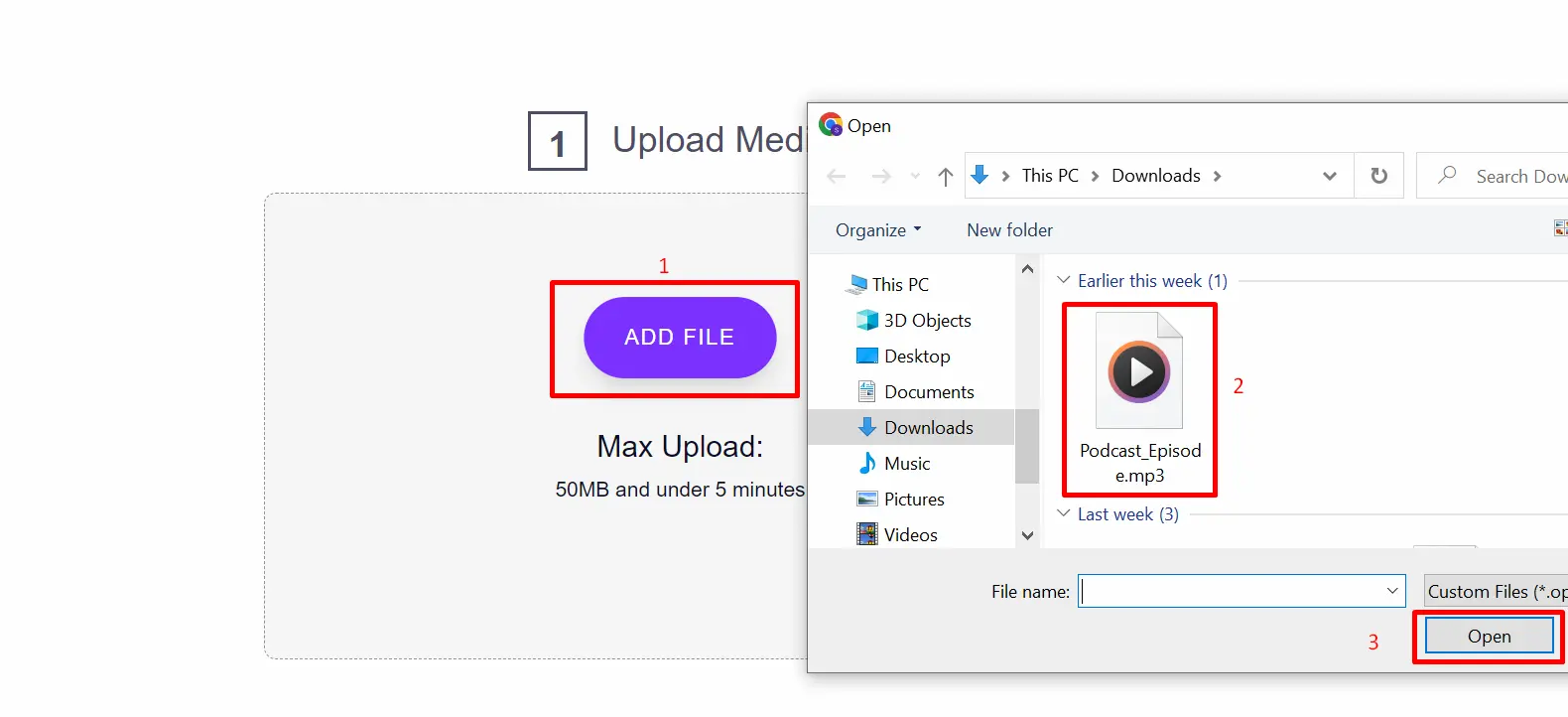
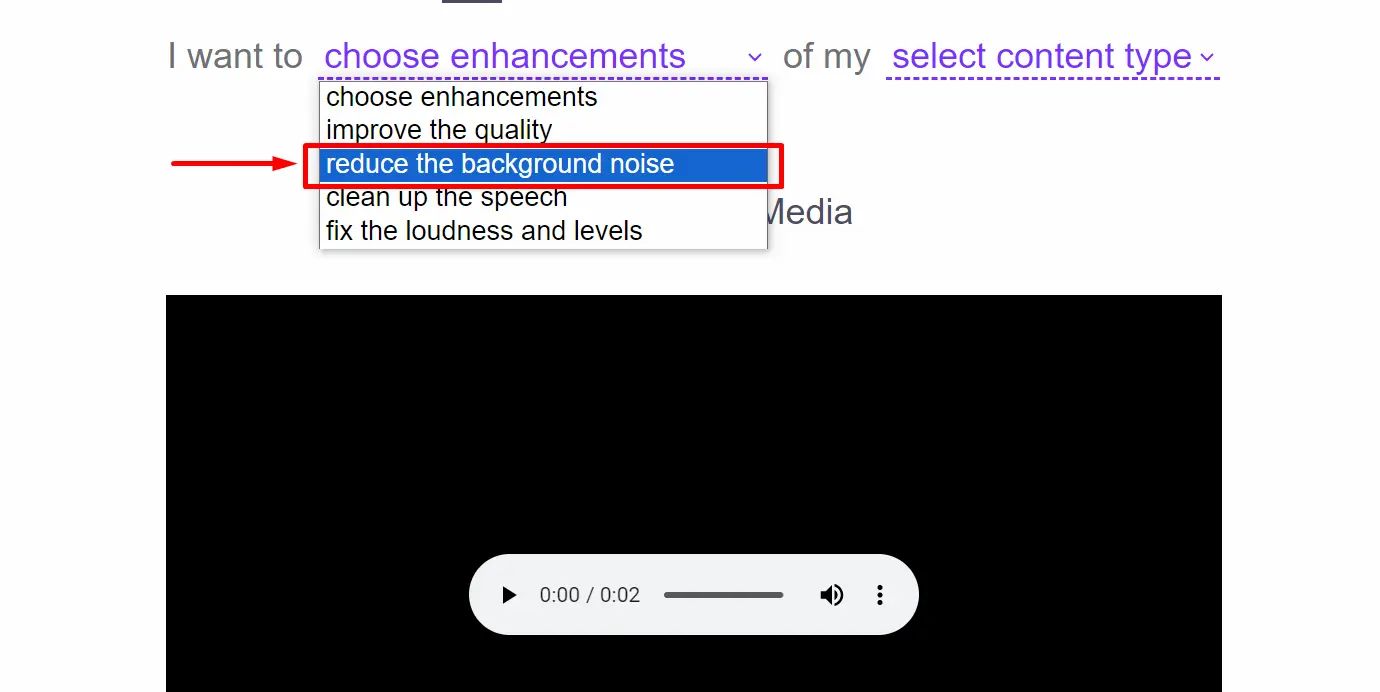
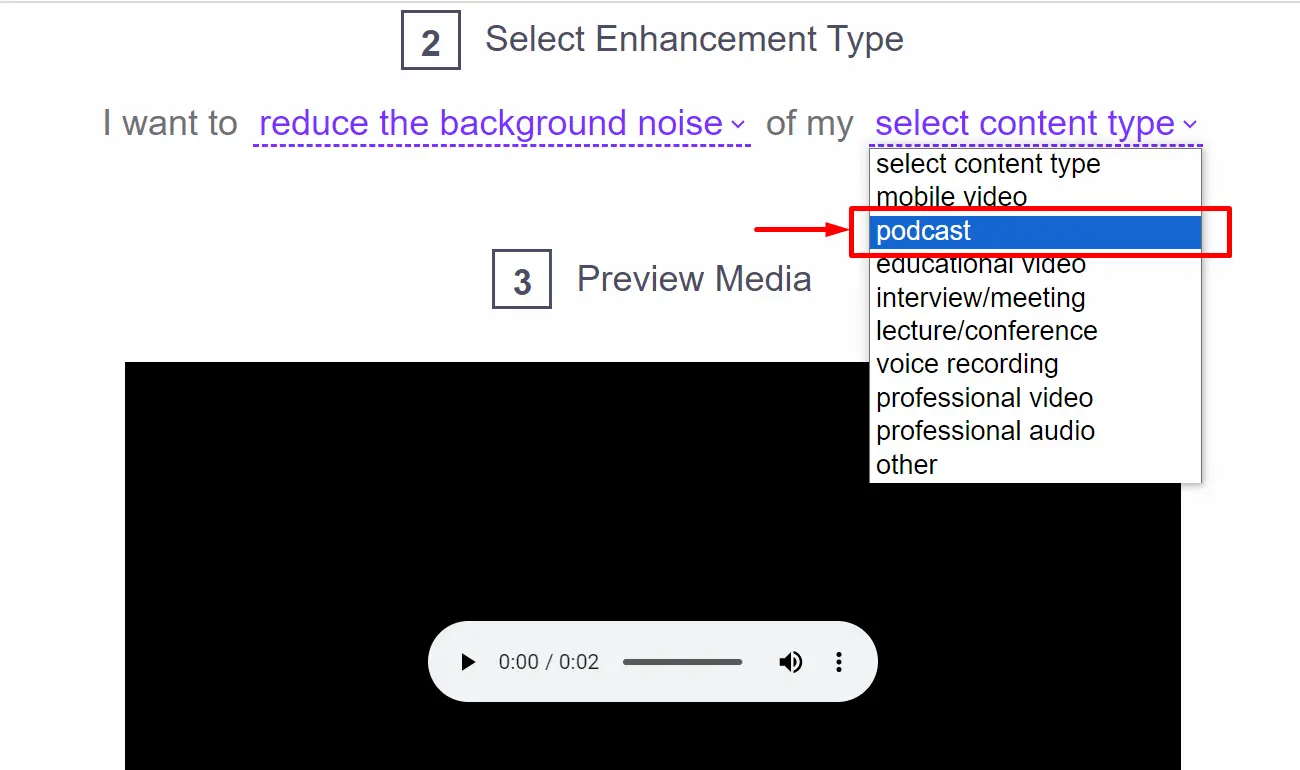
Using Audioenhancer.ai helps you enhance your audio effortlessly. Here's a step-by-step guide, complete with examples, to help you get started:-
Input Your File
-
Choose the Enhancement Type
-
Choose the Content Type
-
Review and Download