Remove and replace image backgrounds with AI in 2026: how far it works, which tools, what it costs
Cutting a product or person out of a photo is now a one-click job in editors such as Photoshop, and replacing the background with a studio backdrop or generated scene is built into tools like Google's Product Studio. Clean subjects work well. Hair, glass, thin parts and unusual products still need manual cleanup, generated backgrounds carry labeling and copyright limits, and you must review what the tool shows buyers.
Where AI stands: Remove and replace image backgrounds · October 2026
As of October 2026, AI is ready to cut out products and people with clear edges, still early for generated replacement backgrounds on marketplace photos, and not ready to handle fine detail, every product type or copyright claims unaided.
- Cutting out clear subjects
Backed by trials or large deployments
- Batch and high-resolution cutouts
- Generated product backdrops
Promising, limited outcome data
- Hair, glass and fine edges
- Hands, wall art, regulated goods
- Copyright in AI backgrounds
Evidence says avoid or add safeguards
What works today
- 1
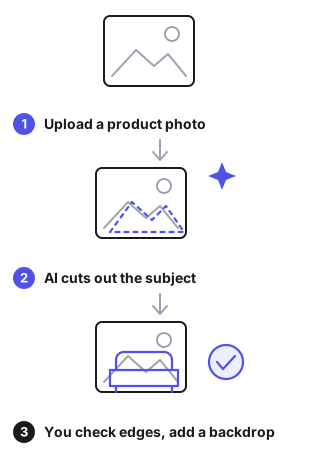
Proven Cut a subject out of a photo in one click and keep the edit reversible.
Evidence
Adobe Photoshop help (checked October 2026): Remove Background is a one-click Quick Action that creates a layer mask rather than deleting pixels. Adobe notes complex edges may need extra refinement. Source ↗
- 2
Early Process full-resolution images through a service, up to 50 megapixels per file.
Evidence
remove.bg help (checked October 2026): accepts JPG, PNG and WebP up to 22 MB, outputs up to 50 megapixels as transparent PNG or colored JPG, and charges 1 credit per full-size image. Vendor documentation. Source ↗
- 3
Early Replace the background of a product photo with a new setting.
Evidence
Google Merchant Center help on Product Studio (checked October 2026): removes and changes backgrounds, and creates new product visuals from text. Google says output may be inaccurate and should be reviewed before publishing. Source ↗
What doesn't work yet
- 1
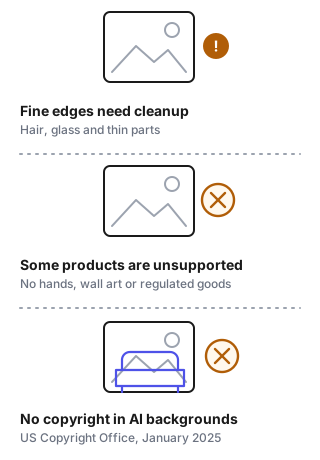
Can't Cut out fine edges such as hair, thin parts and glass without manual cleanup.
Evidence
Qin et al., ECCV 2022: the DIS5K benchmark has 5,470 high-resolution images because highly accurate cutouts of fine structures remain a separate hard task. Adobe also says complex edges may need manual refinement. Source ↗
- 2
Can't Handle every product type in an automated product-photo tool.
Evidence
Google Product Studio help (checked October 2026): works best on centered consumer packaged goods and does not support images with hands, wall art or light fixtures, or regulated goods such as alcohol, weapons and pharmaceuticals. Source ↗
- 3
Can't Give you copyright in an AI-generated background.
Evidence
US Copyright Office, Part 2 report (January 2025): prompts alone do not give enough human control for authorship. Human selection, arrangement or modification can be protected. Source ↗
Where to start
Online seller
Shoot on a plain surface, cut out the product, and zoom in to check the edges. Keep the real color and shape.
Marketing or design team
Use cutouts for mockups and social posts, and keep a person approving any generated scene before it goes live.
Merchant using Google Shopping
Keep the AI metadata tag on generated images and follow the no-overlay rule. Compare each image with the real product.
Tools for this task, by pricing model
Freemium


Pricing not verified yet
| Tool | Pricing model | Free tier | Starting price | Compliance claims | Official site | Last verified |
|---|---|---|---|---|---|---|
 iFoto AI - advanced photo editor online iFoto AI - advanced photo editor online | Not verified | Not verified | Not verified | Not verified | Online (2026-10-25) | 2026-10-01 |
 Photo Eraser Photo Eraser | Not verified | Not verified | Not verified | Not verified | Online (2026-10-28) | 2026-10-01 |
Typical cost
Photoroom Pro costs $7.50 a month billed yearly, and its paid plans include unlimited background removal. Adobe Express Premium costs $9.99 a month, and background removal is available on Premium and higher plans. remove.bg charges 1 credit per full-size image and 0.25 credits per preview-size image.
Prices were checked in October 2026. remove.bg shows its dollar plans only in the app, so compare there.
Data & compliance requirements
General rules that apply to most AI tools, whatever the category. Check which ones apply to your use.
| Name | Applies to | Official source | When it applies |
|---|---|---|---|
| EU AI Act (transparency obligations, Art. 50) | EU | digital-strategy.ec.europa.eu | Users must be told when they are interacting with a chatbot or viewing AI-generated content |
| GDPR | EU/EEA (and non-EU services targeting EU users) | commission.europa.eu | Processing personal data, including personal data in training data |
| US Copyright Office — AI & copyright guidance | US | copyright.gov | Copyright ownership and registration of AI-generated content |
| FTC Act §5 & Endorsement Guides | US | ftc.gov | Claims about AI capabilities; AI-generated reviews or endorsements |
| COPPA | US | ftc.gov | The product may be used by children under 13 |
| NIST AI Risk Management Framework | US (voluntary) | nist.gov | Reference for risk assessment when buying or deploying AI |
| ISO/IEC 42001 (AI management system) | International (voluntary) | iso.org | A vendor claims an AI-governance certification |
This list is a starting point for your own compliance review, not legal advice. Last reviewed 2026-09-24.
Failure modes
- Rough, haloed or missing edgesComplex edges such as hair and thin parts need extra refinement, and fine-structure cutouts are still a research problem. Zoom to 100% on a dark and a light background. Fix edges with a mask brush or a better source photo.Source
- Generated scene misrepresents the productGoogle warns that generated product visuals may be inaccurate and must be reviewed. The tool also does not support some items, such as hands or regulated goods. Compare every generated image with the real product. Keep colors, size and details true.Source
- AI metadata stripped from marketplace imagesGoogle Merchant Center requires images made with generative AI to keep metadata that marks them as AI-generated. Keep the IPTC AI tag when you export, and do not strip metadata in later tools.Source
- Image rejected for overlays or poor framingGoogle's image rules bar promotional text, watermarks and added logos, and ask the product to fill about 75-90% of the frame. Export clean images without overlays and crop the product to the required share of the frame.Source
- No copyright in AI-only backgroundsIn the US, prompts alone do not make you the author of generated images. Use your own or licensed backdrops where you need to own them, and record your human edits.Source
Recent changes: tools for this task
Last verified: 2026-10-03 · auto-checked 2026-10-31 · Reviewed by Toolsfine editorial
- AI Two · pricing page · content changed (awaiting review) ·
- Google Photos · AI alternative note · — → Video models such as Veo do the same … ·
- Google Photos · editor verdict · — → Google Photos: free photo library app… ·
- Google Photos · pricing page URL · — → https://gemini.google/subscriptions/ ·
- Google Photos · free tier · — → {"exists":true,"limits":"Free app; 15… ·
- Google Photos · pricing model · — → Freemium ·
- ON1 Photo RAW · AI alternative note · — → A chatbot cannot process raw files; P… ·
- ON1 Photo RAW · editor verdict · — → ON1 Photo RAW: Windows and macOS raw … ·