Make presentation slides with AI in 2026: how far it works, which tools, what it costs
AI presentation tools can turn a prompt, a document or a set of sources into a first-draft deck with text, images and speaker notes in minutes. Independent benchmarks still find weak design and errors in long source material, and vendors warn that content can be inaccurate. Treat the output as a draft: check every slide against your source, and fix layout by hand.
Where AI stands: Make presentation slides with AI · October 2026
As of October 2026, AI is ready to draft slide outlines and text, still early for full decks built from your documents, and not ready to deliver accurate content or finished design without a person checking every slide.
- Slide outlines and text drafts
Backed by trials or large deployments
- Full decks from documents
- Speaker notes and slide images
- Editing decks slide by slide
Promising, limited outcome data
- Fact-accurate slides without review
- Polished design from one prompt
- Copyright in AI slide art
Evidence says avoid or add safeguards
What works today
- 1
Proven Cut the time to draft the text of a business document by about 40%.
Evidence
Noy and Zhang, Science (2023): 453 professionals wrote press releases, short reports and emails. Average time fell from 27 to 17 minutes and quality was rated about 18% higher. Slide decks were not tested; this supports outline and slide-text drafting only. Source ↗
- 2
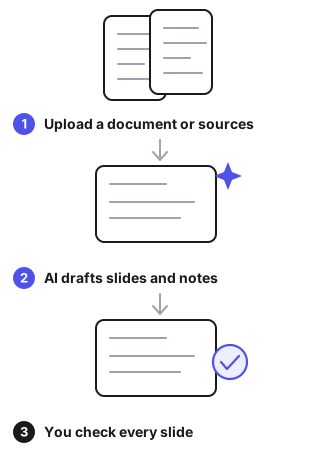
Early Build a first-draft deck, with slides, images and speaker notes, from a document.
Evidence
Microsoft Support (checked October 2026): Copilot in PowerPoint builds complete presentations from documents, including slides, images and speaker notes. The source Word file must be saved to OneDrive. Vendor documentation. Source ↗
- 3
Early Generate a slide deck from uploaded sources and then edit it slide by slide.
Evidence
Google NotebookLM help (checked October 2026): decks are generated from sources in your notebook and can be revised by instruction, layout change, reorder or delete. Sources are not taken into account during revisions. Source ↗
What doesn't work yet
- 1
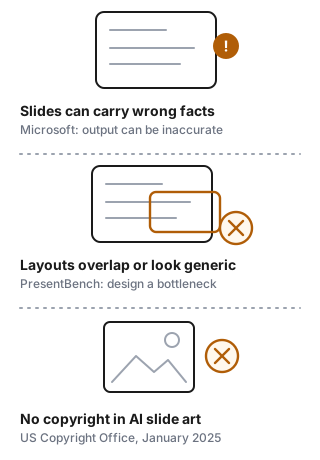
Can't Guarantee that the content on each slide is accurate.
Evidence
Microsoft FAQ for Copilot in PowerPoint (checked October 2026): content it generates can be inaccurate or inappropriate, and users should read it and use their judgment. Google says NotebookLM slide decks may contain visual or factual inaccuracies. Source ↗
- 2
Can't Deliver polished design and faithful summaries of long sources in one pass.
Evidence
PresentBench (238 instances, five domains, nine slide-generation systems including Gamma and NotebookLM): the authors say the task is far from solved, with long-context distillation, visual design and grounding as bottlenecks. The PPTAgent paper also reports overlapping elements that hurt readability. Source ↗
- 3
Can't Give you copyright in AI-generated slide images or artwork.
Evidence
US Copyright Office, Part 2 report (January 2025): prompts alone do not give enough human control for authorship. Human selection, arrangement or modification can be protected. Source ↗
Where to start
Professional with a deadline
Generate the outline and first draft from your own document, then check every slide against it. Fix the layout by hand.
Team with a brand template
Pick a tool that works inside your template, and keep a reviewer for facts and numbers on every deck.
Teacher or student
Use AI to structure the argument, then write the key slides yourself and cite where each fact came from.
Tools for this task, by pricing model
Freemium
| Tool | Pricing model | Free tier | Starting price | Compliance claims | Official site | Last verified |
|---|---|---|---|---|---|---|
 AI PowerPoint Maker AI PowerPoint Maker | Freemium | Not verified | Not verified | Not verified | Online (redirects) (2026-10-29) | Not yet |
 Autoppt - Presentation AI Generator Autoppt - Presentation AI Generator | Freemium | Yes: Free: 1 AI PPT generation, 1 template replacement, 5 daily GPT-3.5 uses | $19.99 / month | Not verified | Online (2026-10-28) | 2026-10-01 |
 Elai - Text-to-video AI generator Elai - Text-to-video AI generator | Freemium | Yes: Free: 1 minute/month | $29 / month | Not verified | Online (2026-10-26) | 2026-10-01 |
Typical cost
Microsoft 365 Personal costs $9.99 a month or $99.99 a year and includes Copilot for the subscription owner. Autoppt has a free plan with 1 AI deck, then Pro at $19.99 a month or $12.49 a month billed yearly (480 generations). Gamma gives new free accounts 400 credits that do not refresh; the Plus plan adds 1,000 monthly credits, and annual billing costs 28% less than monthly. Canva Pro is listed at $144 a year.
Prices were checked in October 2026. Gamma shows its dollar prices only in the app, so compare there. Budget time to check every slide.
Data & compliance requirements
General rules that apply to most AI tools, whatever the category. Check which ones apply to your use.
| Name | Applies to | Official source | When it applies |
|---|---|---|---|
| EU AI Act (transparency obligations, Art. 50) | EU | digital-strategy.ec.europa.eu | Users must be told when they are interacting with a chatbot or viewing AI-generated content |
| GDPR | EU/EEA (and non-EU services targeting EU users) | commission.europa.eu | Processing personal data, including personal data in training data |
| US Copyright Office — AI & copyright guidance | US | copyright.gov | Copyright ownership and registration of AI-generated content |
| FTC Act §5 & Endorsement Guides | US | ftc.gov | Claims about AI capabilities; AI-generated reviews or endorsements |
| COPPA | US | ftc.gov | The product may be used by children under 13 |
| NIST AI Risk Management Framework | US (voluntary) | nist.gov | Reference for risk assessment when buying or deploying AI |
| ISO/IEC 42001 (AI management system) | International (voluntary) | iso.org | A vendor claims an AI-governance certification |
This list is a starting point for your own compliance review, not legal advice. Last reviewed 2026-09-24.
Failure modes
- Wrong or invented facts on slidesGenerated content can be inaccurate, and the tools cannot evaluate accuracy themselves. Check each number, date and claim against your source. Keep the source open while you review.Source
- Weak layout: overlapping or crowded slidesBenchmarks find visual design is a bottleneck, and one research system sometimes produced overlapping elements. Review every slide visually. Rebuild layouts by hand in your own template.Source
- Revisions that ignore your sourcesIn NotebookLM, sources are not taken into account when you revise a slide by instruction, so an edit can add unsupported text. Make factual edits yourself, then re-check the changed slide against the source.Source
- Near-identical decks for similar promptsMicrosoft notes that users with identical prompts may receive nearly identical outputs, and results may match existing web content. Add your own data, examples and story. Remove stock phrasing.Source
- No copyright in AI-only artworkIn the US, prompts alone do not make you the author of generated images. Use licensed or self-made images where you need to own them, and record your human edits.Source
Recent changes: tools for this task
Last verified: 2026-10-03 · auto-checked 2026-10-29 · Reviewed by Toolsfine editorial
- Numerous.ai · AI alternative note · — → Pasting rows into a chatbot works for… ·
- Numerous.ai · editor verdict · — → Numerous.ai: =AI function for Google … ·
- Numerous.ai · integrations · — → ["Google Sheets","Microsoft Excel"] ·
- Shortcut · AI alternative note · — → General chatbots can explain formulas… ·
- Shortcut · editor verdict · — → Shortcut: finance-focused AI agent fo… ·
- Shortcut · public API · — → yes ·
- Shortcut · integrations · — → ["Microsoft Excel","Google Sheets"] ·
- Shortcut · compliance · — → [{"name":"SOC 2 Type II","status":"cl… ·