Analyze spreadsheets and data with AI in 2026: how far it works, which tools, what it costs
AI assistants can read a spreadsheet, write formulas, summarize trends and draw charts from a plain-English request. They get less reliable as the file grows: a March 2026 benchmark found the best model scored 82.4% on financial spreadsheets and 48.6% on the largest one. Treat the output as a draft, recompute key totals against the source, and keep scanned or image-based tables out of the analysis.
Where AI stands: Analyze spreadsheets and data with AI · October 2026
As of October 2026, AI is ready to speed up well-defined analysis, still early for chatting with files and Excel formulas, and not ready to work unsupervised on large financial sheets, scanned tables or complex judgment calls.
- Speeding up well-defined analysis
Backed by trials or large deployments
- Chatting with CSV or Excel files
- Formulas and charts in Excel
Promising, limited outcome data
- Unsupervised work on large sheets
- Scanned or image-based tables
- Complex judgment calls
Evidence says avoid or add safeguards
What works today
- 1
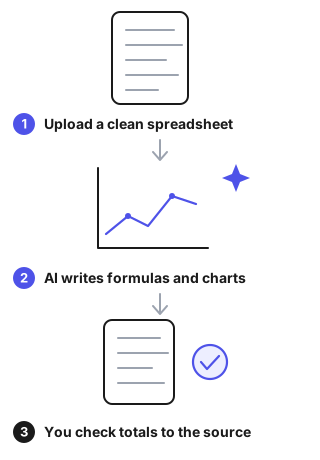
Early Summarize rows and columns, find trends and outliers, and draw charts from an uploaded CSV or Excel file, using Python you can read.
Evidence
OpenAI Help Center (checked October 2026). Accepts .xls, .xlsx and .csv files and runs Python in a notebook environment. OpenAI advises reviewing the generated code, outputs and assumptions before relying on the result. Vendor documentation, no accuracy data. Source ↗
- 2
Early Suggest formulas and show insights in charts and PivotTables inside Excel from a plain-English prompt.
Evidence
Microsoft Support (checked October 2026). Copilot in Excel suggests formula columns and shows insights in charts and PivotTables. The file must be stored on OneDrive or SharePoint and formatted for Copilot. Vendor documentation, no accuracy data. Source ↗
- 3
Proven Finish well-defined analysis and writing tasks faster, with higher quality.
Evidence
Dell'Acqua et al., Organization Science, March 2026. Preregistered experiment with 758 BCG consultants using GPT-4. On 18 tasks inside the model's ability, including analytical ones, AI users completed 12.2% more tasks, 25.1% faster, with higher quality. Not spreadsheet-specific. Source ↗
What doesn't work yet
- 1
Can't Be trusted without supervision on large or complex financial spreadsheets.
Evidence
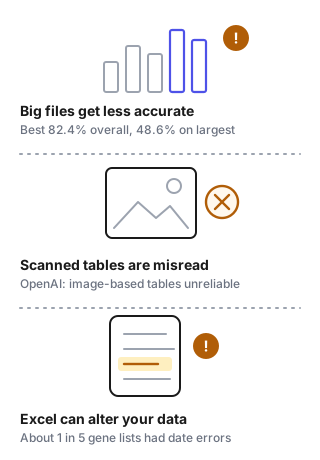
FinSheet-Bench, arXiv 2603.07316 (March 2026). Ten model configurations were tested on synthetic private-equity spreadsheets. The best scored 82.4% overall (Gemini 3.1 Pro; GPT-5.2 with reasoning 80.4%), and accuracy fell to 48.6% on the largest file (152 companies, 8 funds). The authors concluded no standalone model is reliable enough for unsupervised finance use. Source ↗
- 2
Can't Reliably read exact values from scanned files, images of tables or complex layouts.
Evidence
OpenAI Help Center (checked October 2026): ChatGPT "may not reliably extract exact values from image-based tables, scanned files, or files with complex visual layouts." Source ↗
- 3
Can't Stay accurate on complex judgment calls outside what the model handles well.
Evidence
Dell'Acqua et al., Organization Science, March 2026. On one complex managerial task chosen to be outside the model's ability, AI users were 19% less likely to produce a correct answer than people working without AI. Source ↗
Where to start
Analyst or small business owner
Start with a clean CSV of a few hundred rows, ask for a summary and one chart, and recompute two totals by hand before sharing.
Finance team
Ask the AI to write formulas or Python rather than state answers, reconcile every output to the source file, and keep sign-off with a person.
Data or IT lead
Decide which files may be uploaded to an outside service, write it down before staff start, and keep scanned tables out of AI analysis.
Tools for this task, by pricing model
Freemium
| Tool | Pricing model | Free tier | Starting price | Compliance claims | Official site | Last verified |
|---|---|---|---|---|---|---|
 FormulasHQ - AI Generate Excel and Google Sheets Formulas Quickly FormulasHQ - AI Generate Excel and Google Sheets Formulas Quickly | Freemium | Yes: 5 generations per month | Not verified | Not verified | Online (redirects) (2026-10-25) | 2026-10-01 |
 Tablepad Tablepad | Freemium | Not verified | Not verified | Not verified | Online (redirects) (2026-10-29) | Not yet |
Usage-based
| Tool | Pricing model | Free tier | Starting price | Compliance claims | Official site | Last verified |
|---|---|---|---|---|---|---|
 Data Normalizer Data Normalizer | Usage-based | Yes: Up to 25 rows per file, CSV only, low processing priority | Not verified | Not verified | Online (2026-10-26) | 2026-10-01 |
Paid
| Tool | Pricing model | Free tier | Starting price | Compliance claims | Official site | Last verified |
|---|---|---|---|---|---|---|
 Blaze SQL Blaze SQL | Paid | No free plan | $150 / month | Not verified | Online (2026-10-30) | 2026-10-01 |
Pricing not verified yet
| Tool | Pricing model | Free tier | Starting price | Compliance claims | Official site | Last verified |
|---|---|---|---|---|---|---|
 Kater AI Data Analysis Kater AI Data Analysis | Not verified | Not verified | Not verified | Not verified | Online (2026-10-27) | 2026-10-01 |
Typical cost
ChatGPT Plus is $20 a month. Microsoft 365 Copilot Business is $18 per user a month on an annual subscription, added to an existing Microsoft 365 plan. Julius has a free plan, Plus at $20 a month ($16 billed annually) with 2,000 credits, and Pro at $45. FormulasHQ has a free plan with 5 generations a month, and Pro at $4.33 a month billed yearly.
Credits and usage limits, not the seat price, usually decide how far a plan goes. Prices were checked in October 2026.
Data & compliance requirements
General rules that apply to most AI tools, whatever the category. Check which ones apply to your use.
| Name | Applies to | Official source | When it applies |
|---|---|---|---|
| EU AI Act (transparency obligations, Art. 50) | EU | digital-strategy.ec.europa.eu | Users must be told when they are interacting with a chatbot or viewing AI-generated content |
| GDPR | EU/EEA (and non-EU services targeting EU users) | commission.europa.eu | Processing personal data, including personal data in training data |
| US Copyright Office — AI & copyright guidance | US | copyright.gov | Copyright ownership and registration of AI-generated content |
| FTC Act §5 & Endorsement Guides | US | ftc.gov | Claims about AI capabilities; AI-generated reviews or endorsements |
| COPPA | US | ftc.gov | The product may be used by children under 13 |
| NIST AI Risk Management Framework | US (voluntary) | nist.gov | Reference for risk assessment when buying or deploying AI |
| ISO/IEC 42001 (AI management system) | International (voluntary) | iso.org | A vendor claims an AI-governance certification |
This list is a starting point for your own compliance review, not legal advice. Last reviewed 2026-09-24.
Failure modes
- Formulas that look right but compute the wrong thingIn SpreadsheetBench (912 real Excel-forum questions, 2024) the best model scored 15.0% on the strict metric against 62.0% for Excel experts; newer models score higher, but the gap shows why checks matter. Test each formula on three to five rows you can calculate by hand, and reconcile totals to the source before sharing.Source
- Accuracy drops as the file gets biggerFinSheet-Bench accuracy fell from 86.2% on straightforward files to 48.6% on the largest one. Split large workbooks, have the AI write the formula or query instead of stating the answer, and let the spreadsheet do the arithmetic.Source
- Spreadsheet software changes your data on importAbout one-fifth of genomics papers with Excel gene lists contained gene names Excel had converted to dates or numbers (Genome Biology, 2016). Import ID and name columns as text, and spot-check them against the original file.Source
- Copilot cannot work on the file as it isMicrosoft says the data must be stored on OneDrive or SharePoint and formatted for Copilot. Move the file, format the range as a table, and keep a copy of the original.Source
- A confident summary of a flawed analysisOn a task outside the model's ability, AI users were 19% less likely to be correct than people without AI. Ask for the assumptions and the code, and have a person who knows the data decide what the numbers mean.Source
Recent changes: tools for this task
Last verified: 2026-10-03 · auto-checked 2026-11-01 · Reviewed by Toolsfine editorial
- Tablepad · official URL · https://table.studio/dashboard/reil1n… → https://table.studio/dashboard/l2gaxm… ·
- STRProfitMap - AI for Real Estate Investors · pricing page · content changed (awaiting review) ·